
FuSa GamePad :: Add more functionality for your PSP! :: v0.2 - 8 June 2009 - FuSa Project
Sunday, 2010-03-14
FuSa Project
Site menu
Tag Board
200
Our poll
Would you like to have FuSa installed to flash?
Total of answers: 379
Main » 2009 » June » 8 » FuSa GamePad :: Add more functionality for your PSP! :: v0.2
FuSa GamePad :: Add more functionality for your PSP! :: v0.2
2:44 Am

Alright if you dreamed to turn your PSP into USB Gamepad, the time has come :)
With help of new tiny application from -=FuSa TeaM=-

FuSa GAMEPAD

It's very easy now, just launch FuSa GAMEPAD and attach usb cable - and that's all!
No drivers are required!

After you've connected your OS will recognize PSP as GAMEPAD with 4 Axises,  POV and 12 buttons.

SCREENSHOTS:

Control Panel > Game Controllers
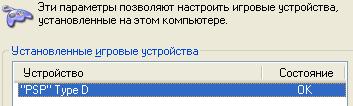

and properties
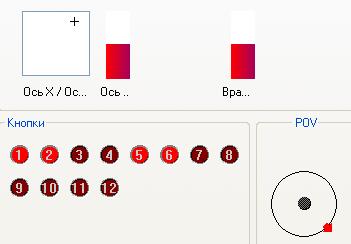
Compatible with both SLIM and PHAT and wait... 3K too :)

Tested with 5.0 M33-6, 5.50 GEN-A (but may work on 3.80+)

Tested OSes:

  • Windows XP
  • Windows Vista
  • Mac OS X Leopard
  • Windows 7
  • Linux*
DOWNLOAD AND TEST IT RIGHT NOW!

SUGGESTION THREAD

ВАШИ ПРЕДЛОЖЕНИЯ


Views: 18067 | Added by: Andy_maN | Rating: 4.8/15 |
Total comments: 1221 2 3 ... 11 12 »
0  
122 Carlos Leite   (2010-03-03 5:30 Am)
cool if foosa game pad act as a mouse, rock band/guitar hero intruments...

0  
121 raiyan   (2010-02-21 0:18 Am)
hi.. i downloaded fusa and it works for nba2k10..wooah! tnx.. but fus awont work on psX emulator (http://psxemulator.gazaxian.com/)
do you have any solution?? i want use it.. pls...

0  
120 BOOLDxBOSS   (2010-01-29 2:27 PM)
i download flisa gmaepad but on my psp it says this game cannot be started the data is corrupted

0  
119 Carlos Leite   (2010-01-29 8:26 Am)
macrofire doesn't work with fusa gamepad, if axis RZ/z could be inverted, this can be used as second analog stick of PS3

0  
118 Vonsch   (2010-01-01 3:37 PM)
Great work!!
Now I can play GTA Vice city since I was used to controlling it in a ps controller. Thanks very much. Hope it works for gta 4

0  
117 Scutu   (2009-12-28 11:58 PM)
Hey,

This app is great, I can use my psp as a ps3 controller .. but .. how can I remap the keys because they are reversed .. and I don't understand why.....

... and I don't understand .. how to do that .. what is macrofire menu ... and if I hod +,- no changes ..

//
people who have problem with buttons of PSP when using as gamepad for PS3, use macrofire homebrew to fix that , it is not a problem of fusa gamepad even using PC gamepad they are inverted

in macrofire menu plugin holding + , - , remap ==>

real key x => o
real key o => square
ral key square => x

thats all , dont forget to turn on macro

//


0  
116 kl   (2009-12-23 6:40 Am)
I have downloaded it and when i open in my psp it say that data is corrupted

0  
115 Jason   (2009-12-23 4:31 Am)
Hi Fusa Team,

I'm very impressed about PSP program like FuSa GAMEPAD.
Due to to learn all about the PSP USB programing it would be very nice for me and for all other interested people
to get all necessary information to handle these.
For that my question: Is it possible for you to open your sources for all the interested people like me and other?

Best regards
Jason


0  
114 Hamza   (2009-12-18 6:01 PM)
sir i have a psp-1000 wid 5.50 gen-b2 . can u make a fusa gamepad version for this cfw !!! plzzz do so !!! <3 <3 <3 <3 !!! rply
Answer: Put in GAME550 folder and it will work

0  
113 Ovanturin   (2009-11-30 8:36 PM)
такая темка работает все кроме стрелочек управления)) незнаю как поменять управление аналогом на стрелочки не подскажите????

1 2 3 ... 11 12 »
Name *:
Email:
Code *:
Login form
E-mail:
Password:
Search
Calendar
«  June 2009  »
SuMoTuWeThFrSa
 123456
78910111213
14151617181920
21222324252627
282930
Last forum messages
Thread: Problem with PAL TV
from: Rilex
Thread: How to set default settings?
from: zone
Thread: trigger_ftu's fusa HD results.
from: trigger_ftu
Thread: MOST RECOMMEND TO FUSA!!!!!!!!!!!!!!!!!!!!!!!!!!!!!!!!!
from: weiyiguo
Thread: Tutorial on how to install Fusa Build 50
from: atat1702
Statistics

Total online: 3
Guests: 3
Users: 0
Copyright MyCorp © 2010
Create a free website with uCoz